Certificates
The Certificates view is accessible via the Certificates menu item in the left navigation. It provides a central location for all certificates managed by IDIAL-APP across all connected containers — without having to navigate into each container individually.
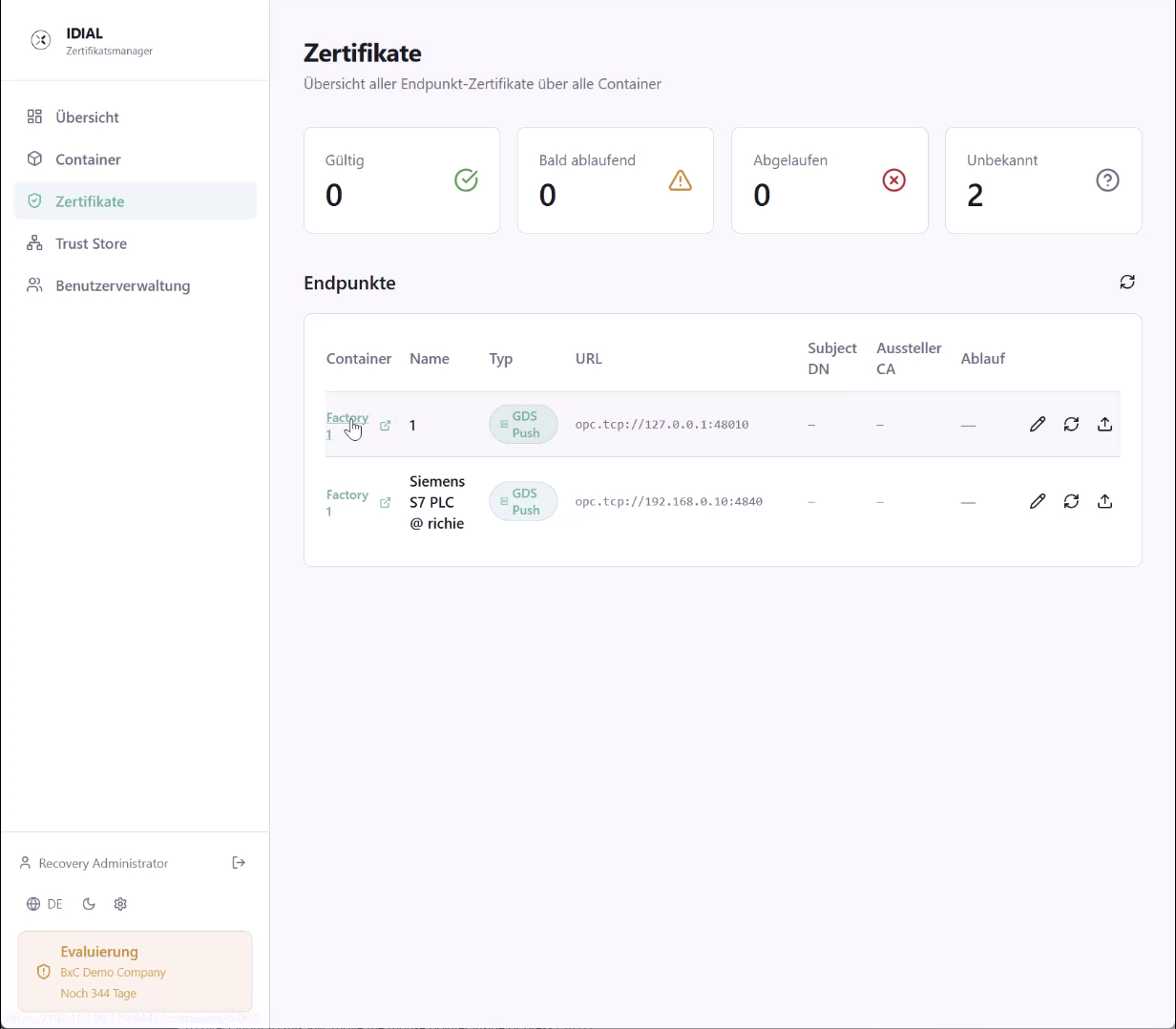
Status Overview
Four tiles at the top show the aggregated certificate counts across all containers:
| Tile | Meaning |
|---|---|
| Valid | Certificates that are active and have not yet expired |
| Expiring Soon | Certificates expiring shortly that should be renewed |
| Expired | Already expired certificates |
| Unknown | Certificates whose status could not be determined |
Endpoint List
Below the tiles, the Endpoints section lists all endpoints from all connected containers with their certificate information. The table shows the following columns:
| Column | Description |
|---|---|
| Container | The container the endpoint belongs to — as a clickable link to the container detail view |
| Name | Name of the endpoint |
| Type | Protocol type of the endpoint (e.g. GDS Push) |
| URL | Connection address of the endpoint |
| Subject DN | Subject field of the active certificate |
| Issuer CA | Issuing CA of the certificate |
| Expiry | Certificate expiry date or status |
Filtering
Clicking one of the four status tiles filters the endpoint list to show only entries matching the selected status. This makes it easy to identify, for example, all expired certificates across all containers at a glance. Clicking the same tile again clears the filter.
Actions per Endpoint
Three actions are available on the right side of each row:
- Pencil icon: Opens the endpoint configuration in the associated container for editing
- Refresh icon: Synchronizes the certificate status for this endpoint
- Upload icon: Opens the dialog for deploying a new certificate to this endpoint
The entire list can be refreshed using the Refresh icon in the top-right corner.
The Certificates view is a consolidated read layer across all containers. Configuration changes to endpoints are still made in Container Management.